


Wednesday, June 16, 2004
Photoshop Tip: Shadow/Highlight
 Requires Photoshop CS
So you want to brighten your photo without doing complex manipulations?
Meet Shadow/Highlight. You can call him "The Light Man". He can create lights out of nowhere and like to eat shadows for breakfast. Got some dark photo? 'The Light Man' to the rescue...
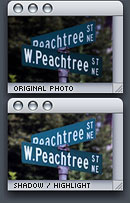 1. Choose Image > Adjustments > Shadow/Highlight...
2. In the Shadow/Highlight dialog box, set Shadows Amount to around 30%. Darker photo = higher Shadows Amount.
Highlights is not always necessary but it's good for reducing the amount of whiteness in photo.
I don't use this feature that often but it's essential to all kinds of photographers.
Tuesday, March 23, 2004
Photoshop Tip of the Week: Trim
 So you want to perfectly crop the document without damaging the graphics or transparency mask?
Meet Trim. She'll be your official haircutter. She can trim away blank areas on top, bottom, left or right. The image isn't transparency? No problem, she has experiences in trimming away plain color. Textured background, on the other hand, is out of her résumé.
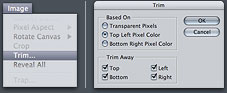 1. Choose Image > Trim
2. In the Trim dialog box, choose either:
 • Top Left / Bottom Right Pixel Color: If there is a background image in any of the colors, use this one. Top Left / Bottom Right are options to let you decide which corner to use as a start point for trimming
3. If you don't want to trim one or more of the sides, unselect the checkboxes in Trim Away.
Your document is now perfectly cropped up. No more wasted space and file size
Wednesday, October 1, 2003
Open Source Photoshop Files
They're free for you to download, view and modify but they cannot be redistributed in any form without written permission from me.
 Download Open Source PS Files
The main purpose of open-sourcing the photoshop files is that you can see how I did the work with layers and layer effects. However they're pretty old and doesn't represent my current skills anymore, I just thought that I should share some of my works.
If you've modified the file to make it look better or something, I'd really love to see the result :)


