


Incorrect icon weight on the right.
Avoid cramming the 128×128 canvas with full-size square graphic. It’ll make your dock feel heavier and not balanced.
What you’ll want to do:
Unbold the icon by resizing it to be slightly smaller. My recommendation is -11 pixel width/height.
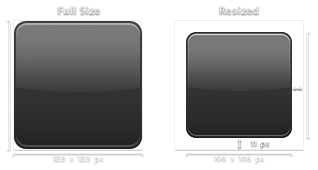
May vary depending on graphic weight.
The result:

Balanced dock after the resize.
Better comparison example:

Ahh, roomy dock.
Correct weight is what you’ll need to make icon sit comfortably in the dock. Same tip can be applied to circle or diagonal shapes.
Note: In some cases, full 128×128 may be necessary. This is mostly good for icons with heavy transparency (ie: large shadow area, transparency objects, etc.)


Nice tutor. ;)
Cool tid-bit. The new site design looks great, and also I see you have downfall rented out. Good movie, would love to hear what you think about it.
Saw Downfall last night and really enjoyed the film. One of the best WWII movies I’ve seen that are historically accurate and not hollywood-ish.
I noticed it also makes the icon look better aswell! Good job…
Also i was think if i resize the icon, do i have to drag it to a new document ?
Not sure what you mean about dragging to new document. You mean you want to drag resized graphic to new 128×128 document in photoshop?
Nice hit… I will remember that for my next icons.
Very nice tip. Innovative way of teaching.
Icon quote –
I’m looking for an icon design of 2 new products that I’m launching. An FTP client and an FTP server. Could you provide me with a quote?
Article on icon desing in Dynamic Graphics magazine
Hi,
I am writing an article for Dynamic Graphics magazine (www.dynamicgraphics.com) on icon design and wanted to contact you to see if there is a designer in particular I can interview for this? I am attaching some very general questions—I’m flexible on these, just need some information. I will also need images of projects—concept to final would be great, or at least just the final—with explanations of how it came to be. If included in the magazine, I will of course send you complimentary copies. Thanks in advance. Please let me know as soon as possible if you or a designer(s) would like to be included in the feature. If so, I will need responses and images by early next week.
Our questions.
1. How or why did you get into icon design? What do love about it? What can be trying or difficult in a project such as this?
2. Please describe your education and professional history.
3. How would you describe icon design or gui?
4. What clients or projects have you worked on involving info graphics?
5. Are there any successes and/or failures in your design work that particularly stick out for you?
6. Are there other designers in this field you look up to, or appreciate the work of?
7. What are you currently working on?
8. Can you send images of projects you’ve done? If you have images of the first rounds and the final project, that would be especially helpful. If so, please send information about how the project changed, grew, or advanced toward the final outcome.
9. Is there any other information you can think of that would be helpful to this story?
Marcy Slane
309.360.1974
marcslane.dynamic@gmail.com
That first graphic made me laugh.