


Xee is a lightweight, fast and convenient image viewer and browser.
Xee (Versiontracker | MacUpdate) is a relatively known Preview.app replacement application. I discovered the app a few days ago and I’m liking it over Preview for its functions and speed. I wanted to give it a cooler icon but with similar position/perspective of Preview icon for better recognizability.
Eye is inspired from old Xee icon (Preview)
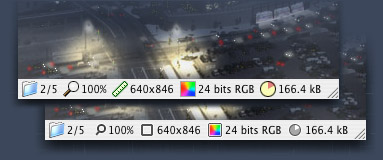
Status Bar icons are also changed (Preview).



Exactly! It’s been two week that I keep visiting (I Googled it already) to see if I can find some answer to that. :(
I tryied CandyBar and to do it by coping and pasting. :(
In response to some of the above questions: one way to apply the icons is using AppHack, http://www.sveinbjorn.org/apphack
Good luck!
It’s sad we need to install this app to do this job when I already bought CandyBar and some people do it (for the main app icon) with copy and paste. Especially for those like me that hate installing a bunch of apps we only use once. :(
Hi Adam, I was looking to download these amazing icons for xee, but I am getting a 404 not found error from the server. Any chance of getting them up and for download again?
Cool Thanks …
Thanks a million for your Xee icons. They really help Xee fit in better with the whole OS X look and feel.
The application stands well on it’s own, as the UI is already very Mac-like –– but this REALLY pushes it over the top. The application’s author should seriously think about using your artwork instead.
Would you sanction that, if I got him to agree?
Do this to replace the icons:
1. In Finder, right-click Xee and choose “Show Package Contents”
2. Go to Contents > Resources
3. Copy/move the new icons into that directory, replacing the old icons
4. Done
thanks for replacement icon set (: Just noting, the unofficial alpha at post 930 (http://wakaba.c3.cx/sup/index.html) already has these replacement icons applied.
Thanks for these, the app and file icons are a huge improvement. Any chance you’ll make an update to include the new file types, like cbr, cbz, and raw?