![]()
Disclaimer: Firefox Icon were designed by Jon Hicks and Firefox Team.
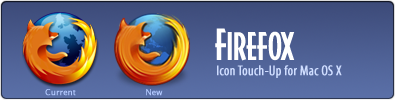
I’ve never liked current Firefox icon although I do admire its artistic design. It just simply didn’t fit in with OS X and I went to touch it up, adding more details for fox, made new globe to be more subtle and gave it correct icon weight so it’ll look good in your Dock.
Dock comparison shot: Preview


nice icon i really thought the same of the firefox icon.It looked weird on the dock.
Nice touch-up. I like it a lot!
The link seems to be wrong downloads the Xee Icons
Nice work……….yet again.
It does look sweeter…
Thanks for correcting the link. Really great Icon again, looks great when its placed next to Adiumy. Although ducks and foxes have never got on in the past I think these 2 can (-;
how about tool bar replacement
You can find many excellent OS X toolbar icons replacement here:
GrApple
http://takebacktheweb.org/
Where do i drag those icon file to replace my old icon looks of firefox?
Thanks
Kevin,
Right-click Firefox app, select Show Package Contents
Contents > Resources
Drag the files in this folder. Click OK to replace the files (if you want to save old icons for some reason, rename them to something different like Firefox2.icns before overwriting them with new icons.)
Remove Firefox app from your dock then add them again. You should see updated icon.
Thank you very much.
I like it! Can you make one without the fox on it? I usually use the icon that way.
NIce touch.. the icons feel more Apple styled.. Thanks Adam
How about a Thunderbird icon to match?
Very nice. I do prefer this to the old one for sure. The proportion and coloring are very well done. Thank you.
Bark, I prefer the current icon, seriously.
Nice work. I like what you’ve done with this one.
I seriously prefer original FireFox Icon
sorry
Very nice. Any chance of getting a Thunderbird Touch-Up? :)
Adam, if you want to go ahead and make your own version of the Firefox app icon, that is your choice, but its a bit presumptuous to say that the original is not “correct” or “doesn’t fit with OS X”. The designer of that icon did what he did for reasons that are unknown to you and simply because you do not like it, does not mean that it is incorrect or designed poorly. Your version is atypical and cliché in my opinion. The very reasons why you do not think it works with OS X are what make it great. IMAO.
Kirk, thanks for the alternative view to this although I think you jumped to the wrong conclusion. I did not said that the icon is incorrect or designed poorly so please do not to put words in my mouth.
Don’t get me wrong, the original design is GREAT but the problem here is it is the exact same version from Windows platform. You can’t expect to borrow an icon from Windows version and have it fit in with OS X perfectly. It’s like putting Volvo’s engine into BMW’s car, you can get it to work but there have to be some tuning to be done.
Hi, it’s really a nice icon.
There are a couple of things that bother me though:
- now my thunderbird icon looks way toooo big ;) it’s frustrating
- one thing that i liked in the original one is that the world beneath the fox doesn’t rapresents the actual earth, it’s just the outline of a generic world’s continent. on the other hand yours shows the usual USA-centric ;) outline… i think the former is a nicer choice, i like its “global” message…
anyway, your version is still really sweet.
Marcello
“You can’t expect to borrow an icon from Windows and have it fit in OS X perfectly.”
I´m sure, it was designed first for Mac OS X.
By the way, where is the problem with the version from Jon Hicks? It is a little bit larger, as the one from Safari and yours is more or less equal sized. Is this the problem? I must say, i don`t understand your arguments.
Regards
Finally, I can keep Firefox in my Dock without occasionally sighing at its Aqua-hostile proportions and shading! Thank you!
Nice work….the incorrect sizing on the default dock icon has driven me insane. Thanks for the fix ;)
Good – the continents looks like continents, fine shadow, earth has better colors, good size
Bad – the back of the fox has now “motion(?) strips”, but this is ugly to the static right front leg
Nice job… but you dont have PNG version for use in Linux system ???
Interesting that you felt that the icon doesn’t fit in with OS X. Arronax is correct, the icon was designed on and for OS X, then made to fit for Windows! Also, the continents were made deliberately ambiguous, so as not to be centric on any particular country.
I do like what you’ve done to the globe though, but the Fox now looks as if its mum has combed its hair! ;)
Heh combed indeed. What’s cool about the original globe is rabbit-shaped land, a nice fit for fox theme intentionally or not.
Icon size was one major issue, everything else was optional though. The way Apple designed the dock, icons have to be slightly small themselves because there’s barely enough space between each icons.
I moved those files to the correct folder and nothing happened
Whenever I place these updated files into the Firefox resources folder, the next time I open Firefox the icon in both the Finder and the Dock changes to the generic Applications icon and the only way to get a FF icon back period is to re-install Firefox. Any ideas?
I agree with Mickey, the motion-stripes don’t really fit in with the stationary arm.
Otherwise I like it much more than the original, though I use Camino and don’t have the problem, but I vote for a Thunderbird-Icon Touch-Up. :)
I’m having the same problem as Evan – Firefox reverts to a generic application icon (FF 2.0 Universal). Any thoughts?
I too am having trouble getting it to show anything other than the generic. (FF2.0) hmm.
me too w/r/t generic app icon. anyone????
For the ones with icon problems:
The icon in the donwload has a capital F in Firefox.icns but the original icon said firefox.icns so try changing it.
Thanks Torben, that did it. duh. I didn’t even come up with that.
After renaming it to firefox.icns (e.g. making it all lowercase) you may need to drag Firefox out of and back into the Applications folder before changes take effect.
Can we possibly get a PNG for other OSs?
Thank Youuuuuuuuuuu!!!
I really really hate the old Firefox icon. It was too big and I can’t stand it. One day I dediced to remove Firefox from my Dock forever. Nowaday’s back, just right to Safari. :-)
I am able to download the file, but it doesn’t show a preview and therefore I’m unable to replace the Firefox icon. I don’t know what I’m doing wrong. I just downloaded and succesfully replaced the iTunes 7 icon.
nevermind, i got it!
I filed a bug with Mozilla on this a while back, but it is not going anywhere:
https://bugzilla.mozilla.org/show_...
Less is more – i love it! :)
Thanks for this lovely icon. It is definitely more OS X. I prefer Camino to Firefox, but I love the FF icon.
I downloaded this icon, renamed it to “appicon.icns”, and dragged it into my Firefox theme in the Caminicon Application. The “document.icns” needs to be copied and renamed “fileBookmark.icns” and a further copy renamed “fileHtml.icns”, and dragged to the relevant place in the theme
Now I have Camino speed, Firefox beauty. Thankyou very much!
This looks way better in the Dock than the original, thanks :D
512px?
Very cool icon, but we need a Leopard ready version.
Thanks.
Yeah any chance of a 512px icon for us Leopard types?
Thanks a lot for the icon replacement. I was skeptical at first, but it really does look a lot better in my dock now!
Great icon — now I can leave FF in my dock! :)
Thanks a lot for releasing it.
Just letting you guys know that Firefox 512×512 icon is next on my to-do list
Thanks Adam! Can not wait!
Marcello said:
> [The original is] just the outline of a generic world’s continent.
& John Hicks said:
> the continents were made deliberately ambiguous, so as not to be centric on any particular country.
I call hokum. The land mass in the middle sure looks a lot like Great Britain to me. ;) Adam’s looks like Northern Europe, but they’re both ambigu-fied enough for “plausible deniability.”
This icon looks much better on my dock, thanks for making it!
I can’t seem to download the file. I can’t tell if it’s my Air or the link …
what a fuck
How do I make it my icon?
Thanks so much for this! I’ve been using this icon happily for quite some time, and, now that I’ve started using Thunderbird as an alternate mail program, of course I began wondering: is a touch-up of the Thunderbird icon in the works? I’d love to see Firefox and Thunderbird “go” together better on my dock. =)
Firefox 3.5 has a new logo:
http://blog.mozilla.com/faaborg/20...
You should touch that one up.
Good – the continents looks like continents, fine shadow, earth has better colors, good size
I love the icon, but any idea how to stop it reverting to the original FF dock icon every time I install a point upgrade?
Many thanks!!
Thank you.
I just searched google hoping someone else felt the firefox icon needed a dechunking. I was excited to see it was you, this is great.