

 So you want to perfectly crop the document without damaging the graphics or transparency mask?
Meet Trim. She’ll be your official haircutter. She can trim away blank areas on top, bottom, left or right. The image isn’t transparency? No problem, she has experiences in trimming away plain color. Textured background, on the other hand, is out of her résumé.
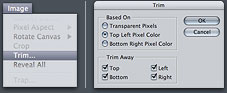 1. Choose Image > Trim
2. In the Trim dialog box, choose either:
 • Top Left / Bottom Right Pixel Color: If there is a background image in any of the colors, use this one. Top Left / Bottom Right are options to let you decide which corner to use as a start point for trimming
3. If you don’t want to trim one or more of the sides, unselect the checkboxes in Trim Away.
Your document is now perfectly cropped up. No more wasted space and file size


So many features of photoshop I haven’t even explored yet. Thanks for the tip! This should save some time for me.
Wow! I’d never seen that before! I used to duplicate the image, merge visible, set the magic wand tolerance to 0, click, invert the selection, expand the selection by 5 or so, then crop. What a timesaver :-P
wow, your theme matches your site :)
Nice tutorial.
I used this trick today
THANKS!
Can’t you also just select all and cut and paste into a new document, which defaults to the size of the non-transparent part?
Mark, I’ve done that all along but since I’ve read about this unknown feature to me, i’ve found plenty of uses for it. Times I wanted to keep layers intact. Times I haven’t wanted to port to a gif/jpg/tif right away.
“Photoshop Tip of the Week”
More like “Photoshop Tip of the Two Months”
Realy helpfull Thankx
and share more option like that
I’m trying to do just that but the trim button is not active. What can I do? I’ve tried selection the layer, the background, both, none and nothing works, whatever I do, the trim is not active (the button is a bit grayer than the rest). Please someone help me, I’ve searched everywhere. I’m using Photoshop CS2 and I’m a beginner. Thanks!
I would love to try the trim option out but the radial for pixel transparency is always grayed out. What’s the trick? I am in PS format, but it’s still grayed out. Is there an option that I am missing? a preference? to have it show?
Thanks, Linda