

 Requires Photoshop CS
So you want to brighten your photo without doing complex manipulations?
Meet Shadow/Highlight. You can call him “The Light Man”. He can create lights out of nowhere and like to eat shadows for breakfast. Got some dark photo? ‘The Light Man’ to the rescue…
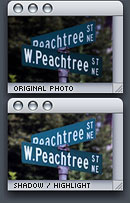 1. Choose Image > Adjustments > Shadow/Highlight…
2. In the Shadow/Highlight dialog box, set Shadows Amount to around 30%. Darker photo = higher Shadows Amount.
Highlights is not always necessary but it’s good for reducing the amount of whiteness in photo.
I don’t use this feature that often but it’s essential to all kinds of photographers.


It should be mentioned also that this is a CS+ only feature.
Good point, I’ll mention that
Damn–you just gave me a reason to upgrade to Photoshop CS.
Of all the options under adjustments I’ve never thought to use that one. Thanks for the smack in the face. ;)
wait…do you live in atlanta?
thanks man ..
its helpful …
thanks for the blog….its really nice & useful information
I want to say thanks alot for everything