

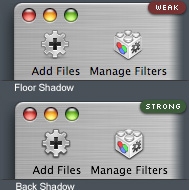
 There are some people who think that Toolbar icons and Brushed Metal Window absolutely doesn’t go together, I do agree with them but after some playing with toolbar icons for my client’s upcoming application, it’s possible for them to look good together by changing the shadow setting. Instead of using standard floor shadow, I used back shadow to help create a depth between icon and Brushed Metal Window.
Another way would be insetting them like Safari’s toolbar controls but it will not works for some icons such as Manage Filters icon on Fig. 1.
Apple should address this problem in their Human Interface Guidelines if they’re going to leave Toolbar support for Brushed Metal Window.


1. who is your client?
2. what font did you use for the font for “Weak” and “Strong”
3. looks nice
Apple’s Human Interface Guidelines say that toolbar icons should have floor shadows. You are disobeying the guidelines here.
I think his point is that the HIG needs an update, because following them atm doesn’t work for metal window toolbars.
Wow, that is an imrovement!
That font is Silkscreen, I think.
http://kottke.org/plus/type/silksc...
1. who is your client?
MacPrime LLC.
2. what font did you use for the font for “Weak” and “Strong”
It’s ‘Silkscreen’, which can be found in this page. It’s nice but the downside is that it doesn’t have lowercase characters. For mini lowercase characters, I used a font called ’04b’. You can download it from here
Apple’s Human Interface Guidelines say that toolbar icons should have floor shadows. You are disobeying the guidelines here.
Incorrect. Apple’s Human Interface Guidelines have no guidelines on what icons should look like on Brushed Metal Window Toolbar.
By the way, I’d suggest you to find a better word than “disobey”. It’s not like we’re following orders from God :)
Brushed metal is being used way too widely these days. This doesn’t look like an app that is supposed to be metal at all. Bad idea of the developer, metal windows aren’t meant to have toolbars with icons.
Yeah but if you look at the whole window, it does fit in Brushed Metal Window Guidelines somehow. It do have iTunes-style Source List on the left.
I could show the screenshot but I’d have to ask the author for permission first.
BTW, there are few Brushed Metal Window that look good with Toolbar such as iSync and Finder :)
IMHO, floor shadow for toolbar items is inappropriate and inconsistent. A window is a floating panel. It has a drop shadow, and its supposed to represent a solid object of data, whatever that might be. A toolbar item should be expected to float off of the page, to emphasize that they are buttons, instead of “floating” above the horizontal bar that separates the toolbar from the window.
Apple says toolbar icons should be shown as if they were sitting on a shelf.
(Er, I was replying to Steve, Adam your idea rox00rz) ;)
Then Apple is, IMO, wrong. :-)
Wow. Strong looks much better.
This icons looks pretty good. the stronger works much better.
Personally, I think Apple needs to get rid of the brushed-metal theme, or at least update it drastically. It’s principle shortcoming is that you can’t easily tell when a window is active or inactive.
What’s the point of having them update the HI Guidelines when a lot of times they do not follow it themselves.