

Using same corner radius setting for both outer and inner rounded rectangles will create a “lump” corner like an eaten mice in snake’s stomach.
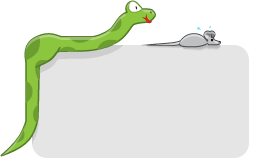
Mmm, mice!
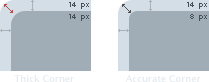
Radius number should always be lower for inner box. In measurement example picture above, I used 14 px for outer box, 8 px for inner box to create a perfect size border all across the corners.

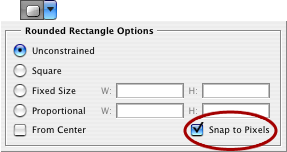
Photoshop’s Rounded Rectangle Tool Setting.
Side Tip: Enable ‘Snap to Pixels‘ in option box if you want box to be sharp instead of loose like vector. Leaving it unchecked will make the box blurry when rasterized.
Image below is an example of widget box my brother designed with incorrect radius setting:
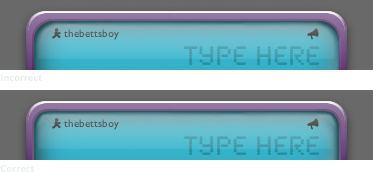
While average Joe will not notice this, it’s something that all graphic designers should know. It will make your work look more professional and accurate.


I notice it ;). Dude, how come I always forget about that tool? I use marquee rect, make a shape, fill it in, make a new layer, draw a circle on one corner, copy it to all other corners, crop the corners of the original rectangle, and merge layers and fill it in again to make sure they’re the same colors.
*dunce*
thxs for the tip adam ;) i never noticed that
Wow. Great tip! Thanks a ton.
love that one
Amen. I’ve been saying this for years and people still don’t get it.
YES!
thanks for the GREAT post! Very useful…
i noticed too and your suggestion is a good way of getting round this. never thought of it as a mouse in a snakes stomach though! lol.
For those dealing with this problem programmatically, here’s a way to calculate the inner corner radius value:
innerRadius = (outerRadius-innerRectWidth)/2
or
innerRadius = outerRadius – outerStrokeWidth
Great information about rounded corners. Thank you for your article.
too much math involved… just make a rectangle, apply rounded rectangle to your desired radius, and use OFFSET PATH (rounded) to make your outer or inner line.
great tutorial