Download new version at www.deliciousmonster.org

Changelist:

  • All puzzles should now be solvable.
  • The state of the buttons is now saved when Lights Off is quit.
  • Button presses can now be cancelled by dragging your finger off the button before letting go.
  • Minor graphic changes (main icon and bigger buttons)

It should be available via iPhone’s unofficial Installer.app sometime soon.

Tip: If you’re unable to turn off all lights in a specific level, try throw your iPhone to the cement floor hard to break the LCD light. Mission accomplished.

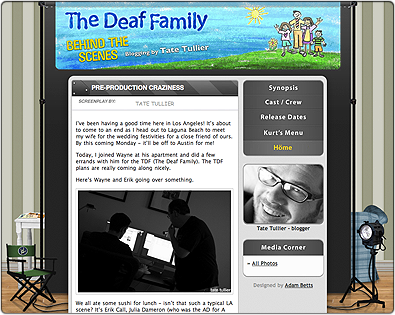
Updated blog design for Mösdeux‘s next comedy film “The Deaf Family”. Shooting will start this September 4th in Texas.

Mösdeux’s Behind the Scene: “The Deaf Family”

Original Behind the Scene design can be seen here: Behind the Scene: “A Permanent Grave”.

Image

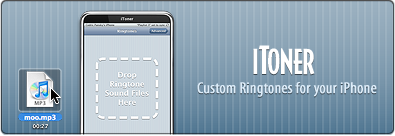
Designed the interface for Ambrosia Software‘s iToner based on iPhone’s interface. One of the nice reasons for using iPhone interface is it’ll stand out as a real iPhone app that’ll transfer the ringtones the clean way, not ugly hacks (ie: jailbreak, etc.)

I’m not done with iToner interface design though, I will continue to tweak it and add more graphics to make user experience as smooth as possible.

“iToner enables you to quickly transfer custom ringtones for your iPhone – without modifying, hacking or having to reset your iPhone. Simply drag and drop your MP3 or AAC audio files on iToner’s window, click the Sync button, and you’re done.”

iToner Webpage

Image

Last tuesday, Lucas Newman (developer of Delicious Library) and I built the entire game within three days for C-4 Iron Coder and we won 2nd place next to Video Conference for iPhone.

Download link and brief installation instructions is at Lights Off website.

Movie of it in action

I’ve always loved Lights Out game from Tiger Electronic and iPhone with touch screen couldn’t be any more perfect for Lights Out-type game. This game is freeware and you should use it at your own risk. I’m not going to provide detailed installation instructions here as it’s fairly complex but I will update this post with a link when there is one.

Edit: This instruction is pretty good iPhone Atlas – 5-step process for putting apps on your iPhone

I will be moving to North Hollywood, California this Aug. 17th.

3,000 miles but…
No humidity and Terminator as a government? Priceless.

I’m gonna miss snow but I’m sure the sheer fun of earthquakes will make up for it.

I will probably post pics on the way with my iPhone or shortly after I arrived there.

Image
Get the *real* icon for Cyndicate =)

Cyndicate is a great RSS reader application with nice interface. If you liked PulpFiction (app, not movie), you will like this app too. Personally I still prefer NewsFire as my main RSS reader but here you go:

Flow Website

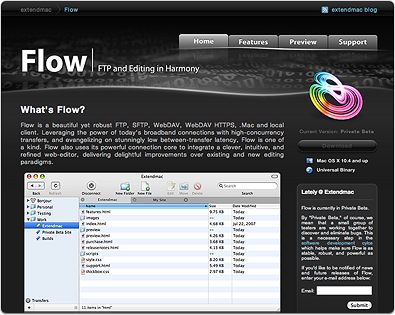
This is one of the side projects I’ve been working on and you can view it at www.extendmac.com/flow (May 2008, note: current flow website is different.) Flow is an upcoming FTP application for Mac OS X (currently in closed private beta.) When Brian of Extendmac Software asked me if I could design the website and icons, I was definitely interested as I admire Flow a lot for its simplicity and beautiful interface but I could only do website design and not app icon as I was spreading too thin with other projects so I got another icon designer, Josh Pyles of Pixelmatrix Design, to join the project. While the icon he delivered was perfectly fine, Brian wanted something truly unique so we got another icon designer, Sebastiaan de With, to do the icon and the result is what you see right now.

I also did some of the app toolbar icons and Sebastiaan did a simply fantastic job on the application icon. You can read about his work progress on the icon at his blog, Cocoia Blog.

This is one of the projects I truly enjoyed doing along with great people like Brian and Sebastiaan.

I’ve been working overtime for the last 6 months and soon you’ll see what I’ve been working on lately. I currently have 3 major projects and 1 side project, most of them are focused on interface design which I’ve been involved more and more. One of the projects is for Leopard only and it’s one I’m excited the most about :)

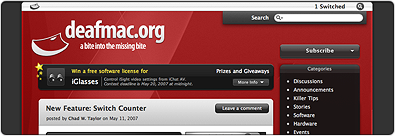
Here’s a simple blog design I did last May for deafmac.org, a blog focused on accessibility features in Mac OS X and of course deaf Mac community.

Note (May 2008): There is updated Adobe CS3 Icon Set that includes higher resolution (512×512 for Leopard) and several more CS3 app icons. Go to this post: Adobe CS3 Hi-Res Icon Set

Adobe GoLive 9 was released today with CS3 interface upgrade (free 30 days trail available). Here’s the icon replacement for them:

Quick download link for entire Adobe CS3 icon set replacement, CS3 Icon Replacement file

Entire Flag graphics is now available in a single zip file. One caveat: you’ll have to download Old Glory screensaver yourself first then install the graphic manually. I cannot provide them prebuilt as per Old Glory screensaver author’s request. I don’t plan on doing additional flags for a while.

Graphics included: America, Canada, Australia, Iceland, Iraq, Italy, Palestine, Venezuela, Malaysia

Non-country graphics: White Apple on Black, White Apple on Tiger BG, Panther Logo on Black

Instruction: Download Old Glory screensaver, right-click (or ctrl-click) on Old Glory.saver file and select Show Package Contents. Go to Content > Resources. Rename your preferred flag to OldGlory.tiff and drag it to that folder, select Accept when asked if you want to replace the file. Double click Old Glory.saver to install it.