2007


Flow Website

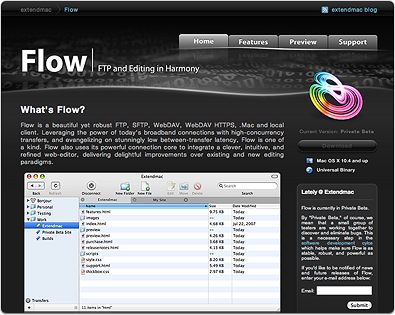
This is one of the side projects I’ve been working on and you can view it at www.extendmac.com/flow (May 2008, note: current flow website is different.) Flow is an upcoming FTP application for Mac OS X (currently in closed private beta.) When Brian of Extendmac Software asked me if I could design the website and icons, I was definitely interested as I admire Flow a lot for its simplicity and beautiful interface but I could only do website design and not app icon as I was spreading too thin with other projects so I got another icon designer, Josh Pyles of Pixelmatrix Design, to join the project. While the icon he delivered was perfectly fine, Brian wanted something truly unique so we got another icon designer, Sebastiaan de With, to do the icon and the result is what you see right now.

I also did some of the app toolbar icons and Sebastiaan did a simply fantastic job on the application icon. You can read about his work progress on the icon at his blog, Cocoia Blog.

This is one of the projects I truly enjoyed doing along with great people like Brian and Sebastiaan.

I’ve been working overtime for the last 6 months and soon you’ll see what I’ve been working on lately. I currently have 3 major projects and 1 side project, most of them are focused on interface design which I’ve been involved more and more. One of the projects is for Leopard only and it’s one I’m excited the most about :)

Here’s a simple blog design I did last May for deafmac.org, a blog focused on accessibility features in Mac OS X and of course deaf Mac community.

Note (May 2008): There is updated Adobe CS3 Icon Set that includes higher resolution (512×512 for Leopard) and several more CS3 app icons. Go to this post: Adobe CS3 Hi-Res Icon Set

Adobe GoLive 9 was released today with CS3 interface upgrade (free 30 days trail available). Here’s the icon replacement for them:

Quick download link for entire Adobe CS3 icon set replacement, CS3 Icon Replacement file

Entire Flag graphics is now available in a single zip file. One caveat: you’ll have to download Old Glory screensaver yourself first then install the graphic manually. I cannot provide them prebuilt as per Old Glory screensaver author’s request. I don’t plan on doing additional flags for a while.

Graphics included: America, Canada, Australia, Iceland, Iraq, Italy, Palestine, Venezuela, Malaysia

Non-country graphics: White Apple on Black, White Apple on Tiger BG, Panther Logo on Black

Instruction: Download Old Glory screensaver, right-click (or ctrl-click) on Old Glory.saver file and select Show Package Contents. Go to Content > Resources. Rename your preferred flag to OldGlory.tiff and drag it to that folder, select Accept when asked if you want to replace the file. Double click Old Glory.saver to install it.

Updated file for QuickTime 7.5.5:

QuickTime Controller Graphics
File Size: 176 KB

Installation: Open System / Library / QuickTime / QuickTimeComponents.component. Right-click and select Show Package Contents. Contents / Resources and replace QuickTimeComponents.rsrc

Note (May 2008): There is updated Adobe CS3 Icon Set that includes higher resolution (512×512 for Leopard) and several more CS3 app icons. Go to this post: Adobe CS3 Hi-Res Icon Set

Adobe InCopy CS3, Adobe Apollo and Adobe Flex Builder icons has been added to main CS3 Icon Replacement file. Separate file for those 3 icon set:

Note (May 2008): There is updated Adobe CS3 Icon Set that includes higher resolution (512×512 for Leopard) and several more CS3 app icons. Go to this post: Adobe CS3 Hi-Res Icon Set

Adobe Photoshop Lightroom CS3 and Adobe Version Cue CS3 icons has been added to main CS3 Icon Replacement file but you can download Lightroom icons replacement separately here

Note (May 2008): There is updated Adobe CS3 Icon Set that includes higher resolution (512×512 for Leopard) and several more CS3 app icons. Go to this post: Adobe CS3 Hi-Res Icon Set

Full icon set replacement for Creative Studio 3 based on CS3 retail product box design.

What’s missing is document icon for Contribute CS3 and few more small CS3 apps. I’ll do second part as soon as Adobe releases more CS3 apps to public.

Note: Some CS3 apps have custom icon applied to them. If app icon didn’t change after installing .icns files, do a Get Info on app and delete its custom icon by clicking on icon at top-left of Get Info window and hit Delete key. Logout or force-quit Finder for icon changes to take effective.

Update: Windows version ported by Eli (the-ace), you can get it from http://www.deviantart.com/deviation/53728408/

As requested, here’s a replacement icon for NewsFire.


Click on pic to see medium size of my room. Full-size version.
Pic of my previous displays setup.

To see how fast Mac Pro Clovertown is, check this Quicktime movie of Cinema 4D 10.1 rendering a slightly complex scene (scene is a demo included in Cinema 4D package);

cinemarendering.mov (2 MB)

In menu extras on the top-right of screen, you’ll see 8 different percentages and you can see that Cinema 4D took full advantage of all 8 cores.

I’m really loving the speed improvement but Photoshop CS3 doesn’t seem to be truly taking advantage of all cores so the speed improvement isn’t as dramatic as Cinema 4D rendering but it’s still pretty acceptable to me. I just need to upgrade from 2 GB of RAM to 3 or 4 GB to make Photoshop really happy.

“With great power comes great RAM requirement.”

Latest Tweet

    Recent Posts

    Monthly

    • 2010 (1)
    • 2009 (1)
    • 2008 (14)
    • 2007 (31)
    • 2006 (66)
    • 2005 (1)
    • 2004 (56)
    • 2003 (16)